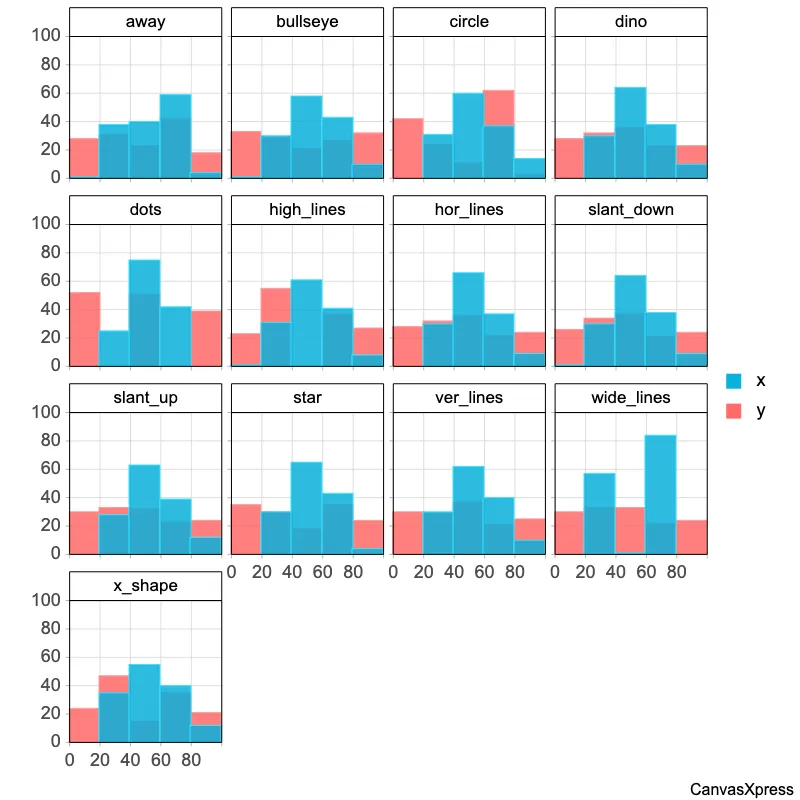
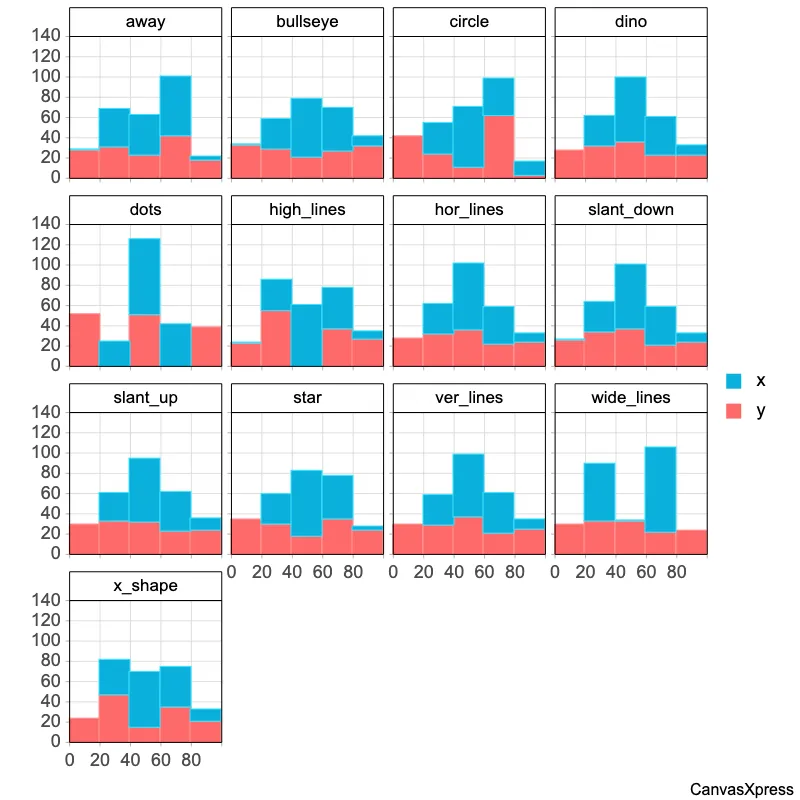
Master Histograms for Data Analysis
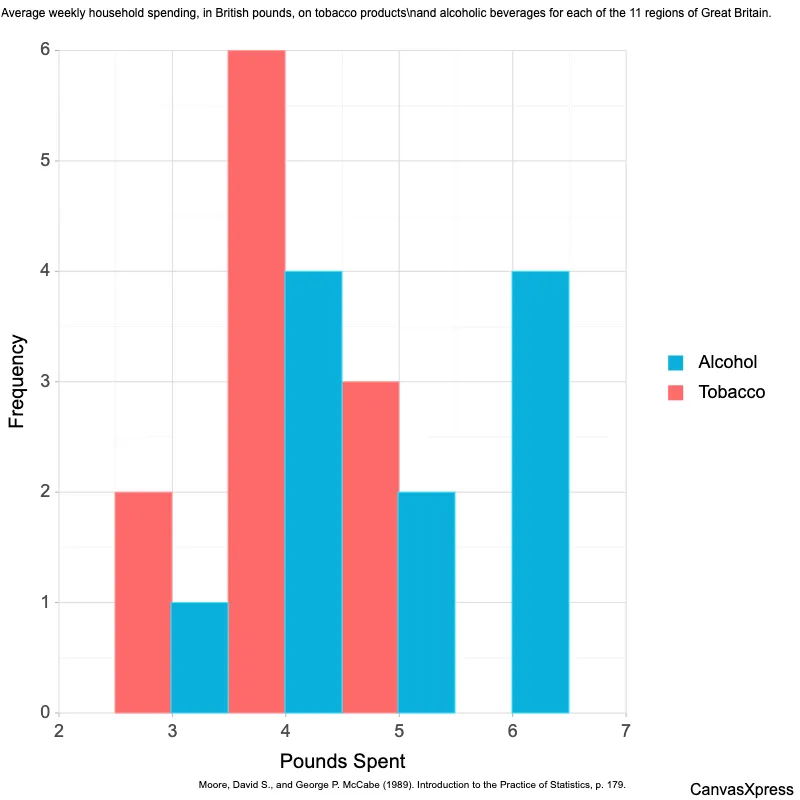
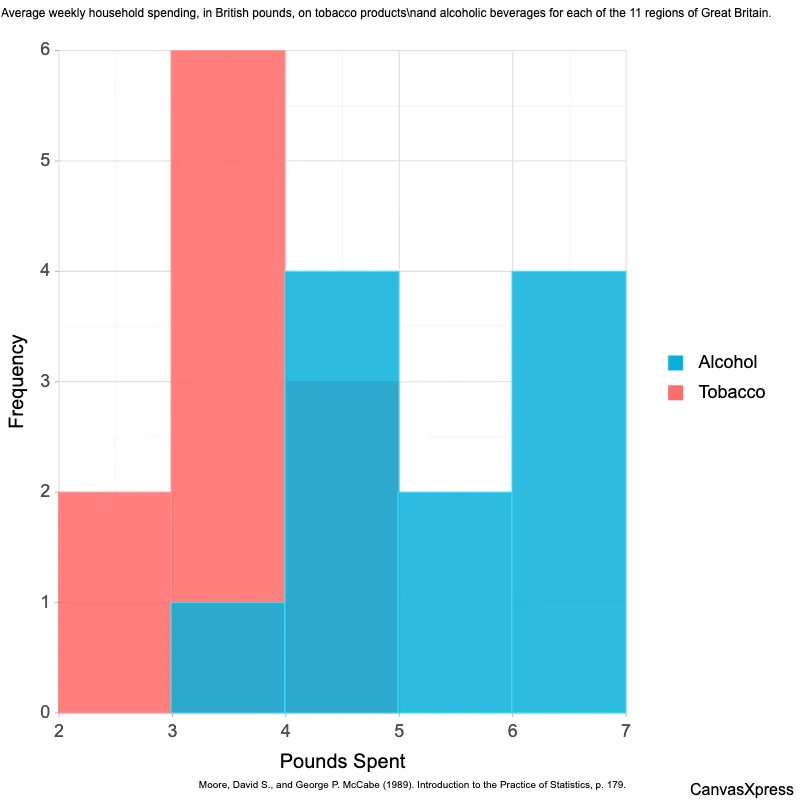
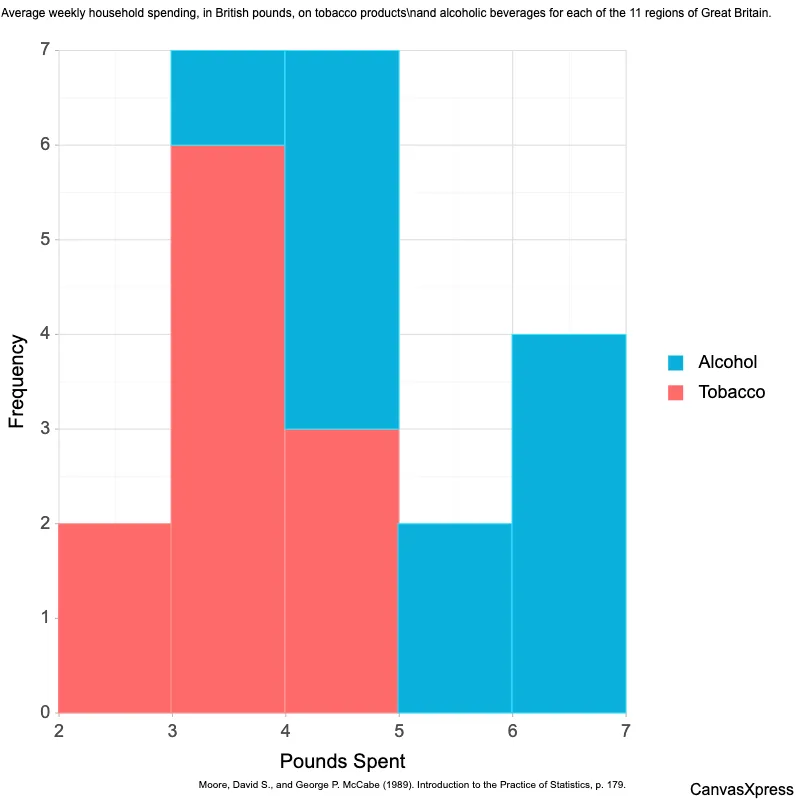
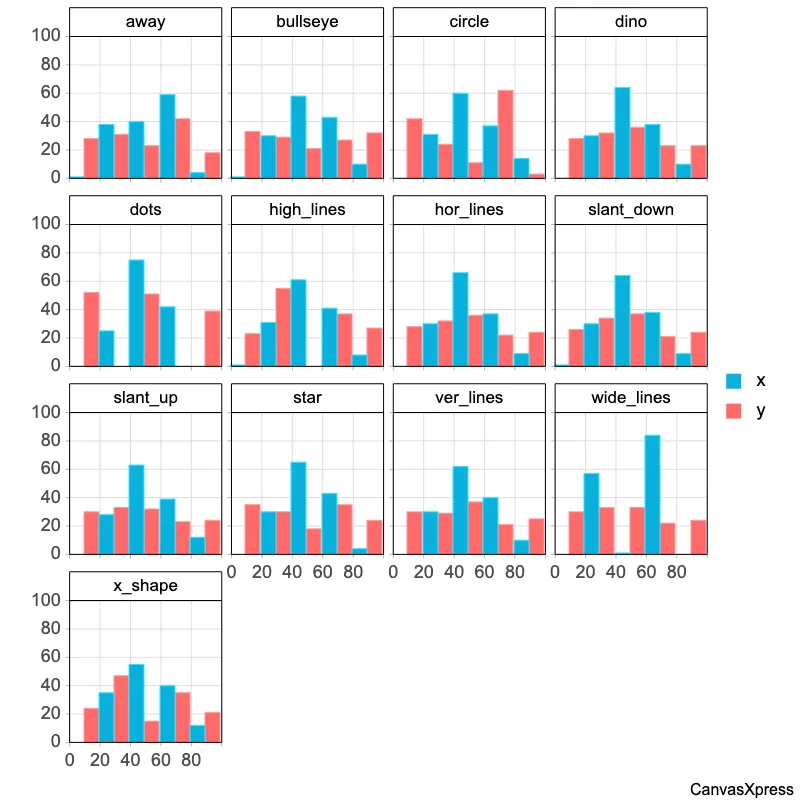
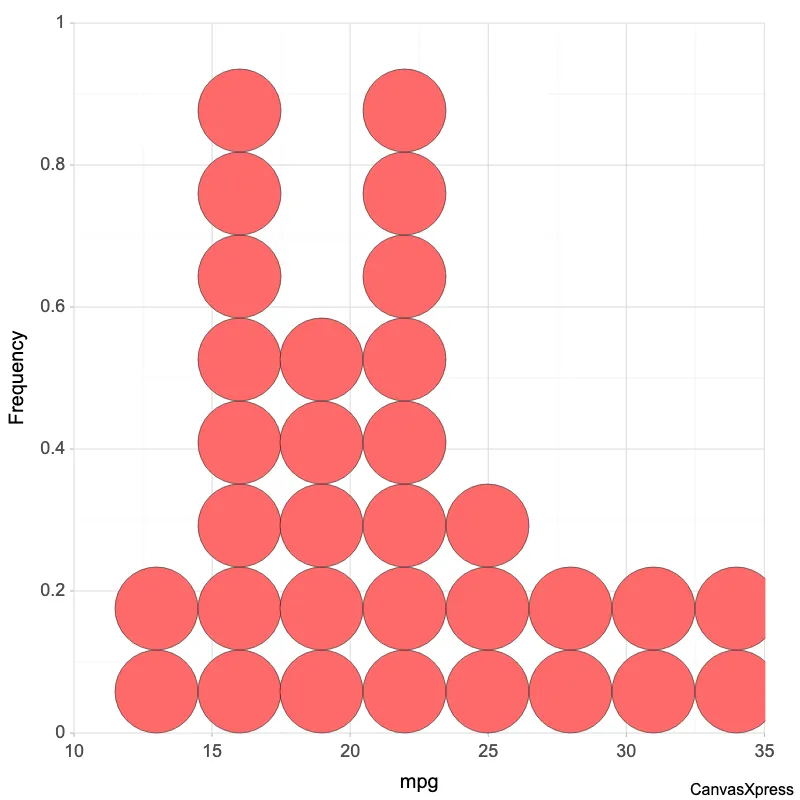
Histograms are powerful visual tools for understanding data distributions. They group data into ranges (bins) and display the frequency of data points within each bin using bars. Histograms are particularly useful for identifying patterns, such as the central tendency, spread, and skewness of a dataset. They are frequently used in statistics and data analysis for exploratory data analysis and to communicate data findings effectively. Creating a histogram involves choosing the appropriate number of bins. Too few bins can obscure important details, while too many can make the histogram appear cluttered and difficult to interpret. Histograms are distinct from bar charts; while both use bars, bar charts compare distinct categories, whereas histograms show the distribution of a continuous variable.


<html>

  <head>
    <!-- Include the CanvasXpress library in your HTML file -->
    <link rel="stylesheet" href="https://www.canvasxpress.org/dist/canvasXpress.css" type="text/css"/>
    <script src="https://www.canvasxpress.org/dist/canvasXpress.min.js"></script>
  </head>

  <body>

    <!-- Create a canvas element for the chart with the desired dimensions -->
    <div>
      <canvas id="canvasId" width="600" height="600"></canvas>
    </div>


    <!-- Create a script to initialize the chart -->
    <script>

      // Use a data frame (2D-array) for the graph
      var data = [
        [ "Id", "mpg", "carb", "am", "cyl", "disp", "drat", "hp", "qsec", "gear", "vs", "wt"],
        [ "Mazda RX4", 21, 4, 1, 6, 160, 3.9, 110, 16.46, 4, 0, 2.62],
        [ "Mazda RX4 Wag", 21, 4, 1, 6, 160, 3.9, 110, 17.02, 4, 0, 2.875],
        [ "Datsun 710", 22.8, 1, 1, 4, 108, 3.85, 93, 18.61, 4, 1, 2.32],
        [ "Hornet 4 Drive", 21.4, 1, 0, 6, 258, 3.08, 110, 19.44, 3, 1, 3.215],
        [ "Hornet Sportabout", 18.7, 2, 0, 8, 360, 3.15, 175, 17.02, 3, 0, 3.44],
        [ "Valiant", 18.1, 1, 0, 6, 225, 2.76, 105, 20.22, 3, 1, 3.46],
        [ "Duster 360", 14.3, 4, 0, 8, 360, 3.21, 245, 15.84, 3, 0, 3.57],
        [ "Merc 240D", 24.4, 2, 0, 4, 146.7, 3.69, 62, 20, 4, 1, 3.19],
        [ "Merc 230", 22.8, 2, 0, 4, 140.8, 3.92, 95, 22.9, 4, 1, 3.15],
        [ "Merc 280", 19.2, 4, 0, 6, 167.6, 3.92, 123, 18.3, 4, 1, 3.44],
        [ "Merc 280C", 17.8, 4, 0, 6, 167.6, 3.92, 123, 18.9, 4, 1, 3.44],
        [ "Merc 450SE", 16.4, 3, 0, 8, 275.8, 3.07, 180, 17.4, 3, 0, 4.07],
        [ "Merc 450SL", 17.3, 3, 0, 8, 275.8, 3.07, 180, 17.6, 3, 0, 3.73],
        [ "Merc 450SLC", 15.2, 3, 0, 8, 275.8, 3.07, 180, 18, 3, 0, 3.78],
        [ "Cadillac Fleetwood", 10.4, 4, 0, 8, 472, 2.93, 205, 17.98, 3, 0, 5.25],
        [ "Lincoln Continental", 10.4, 4, 0, 8, 460, 3, 215, 17.82, 3, 0, 5.424],
        [ "Chrysler Imperial", 14.7, 4, 0, 8, 440, 3.23, 230, 17.42, 3, 0, 5.345],
        [ "Fiat 128", 32.4, 1, 1, 4, 78.7, 4.08, 66, 19.47, 4, 1, 2.2],
        [ "Honda Civic", 30.4, 2, 1, 4, 75.7, 4.93, 52, 18.52, 4, 1, 1.615],
        [ "Toyota Corolla", 33.9, 1, 1, 4, 71.1, 4.22, 65, 19.9, 4, 1, 1.835],
        [ "Toyota Corona", 21.5, 1, 0, 4, 120.1, 3.7, 97, 20.01, 3, 1, 2.465],
        [ "Dodge Challenger", 15.5, 2, 0, 8, 318, 2.76, 150, 16.87, 3, 0, 3.52],
        [ "AMC Javelin", 15.2, 2, 0, 8, 304, 3.15, 150, 17.3, 3, 0, 3.435],
        [ "Camaro Z28", 13.3, 4, 0, 8, 350, 3.73, 245, 15.41, 3, 0, 3.84],
        [ "Pontiac Firebird", 19.2, 2, 0, 8, 400, 3.08, 175, 17.05, 3, 0, 3.845],
        [ "Fiat X1-9", 27.3, 1, 1, 4, 79, 4.08, 66, 18.9, 4, 1, 1.935],
        [ "Porsche 914-2", 26, 2, 1, 4, 120.3, 4.43, 91, 16.7, 5, 0, 2.14],
        [ "Lotus Europa", 30.4, 2, 1, 4, 95.1, 3.77, 113, 16.9, 5, 1, 1.513],
        // ... (data truncated after 29 records for clarity)
      ]

      // Create the configuration for the graph
      var config = {
        "graphType": "Scatter2D",
        "histogramAsDotplot": true,
        "histogramBinWidth": 3,
        "showHistogram": true,
        "xAxis": ["mpg"],
        "xAxisTitle": "mpg",
        "yAxisTitle": "Frequency"
      }

      // Event used to create graph (optional)
      var events = false

      // Call the CanvasXpress function to create the graph
      var cX = new CanvasXpress("canvasId", data, config, events);

    </script>

  </body>

</html>
<html>

  <head>
    <!-- Include the CanvasXpress library in your HTML file -->
    <link rel="stylesheet" href="https://www.canvasxpress.org/dist/canvasXpress.css" type="text/css"/>
    <script src="https://www.canvasxpress.org/dist/canvasXpress.min.js"></script>
  </head>

  <body>

    <!-- Create a canvas element for the chart with the desired dimensions -->
    <div>
      <canvas id="canvasId" width="600" height="600"></canvas>
    </div>


    <!-- Create a script to initialize the chart -->
    <script>

      // Create the data for the graph
      var data = {
         "y" : {
            "data" : [
              [21],
              [21],
              [22.8],
              [21.4],
              [18.7],
              [18.1],
              [14.3],
              [24.4],
              [22.8],
              [19.2],
              [17.8],
              [16.4],
              [17.3],
              [15.2],
              [10.4],
              [10.4],
              [14.7],
              [32.4],
              [30.4],
              [33.9],
              [21.5],
              [15.5],
              [15.2],
              [13.3],
              [19.2],
              [27.3],
              [26],
              [30.4],
              [15.8],
              [19.7],
              [15],
              [21.4]
            ],
            "smps" : ["mpg"],
            "vars" : ["Mazda RX4","Mazda RX4 Wag","Datsun 710","Hornet 4 Drive","Hornet Sportabout","Valiant","Duster 360","Merc 240D","Merc 230","Merc 280","Merc 280C","Merc 450SE","Merc 450SL","Merc 450SLC","Cadillac Fleetwood","Lincoln Continental","Chrysler Imperial","Fiat 128","Honda Civic","Toyota Corolla","Toyota Corona","Dodge Challenger","AMC Javelin","Camaro Z28","Pontiac Firebird","Fiat X1-9","Porsche 914-2","Lotus Europa","Ford Pantera L","Ferrari Dino","Maserati Bora","Volvo 142E"]
         },
         "z" : {
            "am" : [1,1,1,0,0,0,0,0,0,0,0,0,0,0,0,0,0,1,1,1,0,0,0,0,0,1,1,1,1,1,1,1],
            "carb" : [4,4,1,1,2,1,4,2,2,4,4,3,3,3,4,4,4,1,2,1,1,2,2,4,2,1,2,2,4,6,8,2],
            "cyl" : [6,6,4,6,8,6,8,4,4,6,6,8,8,8,8,8,8,4,4,4,4,8,8,8,8,4,4,4,8,6,8,4],
            "disp" : [160,160,108,258,360,225,360,146.7,140.8,167.6,167.6,275.8,275.8,275.8,472,460,440,78.7,75.7,71.1,120.1,318,304,350,400,79,120.3,95.1,351,145,301,121],
            "drat" : [3.9,3.9,3.85,3.08,3.15,2.76,3.21,3.69,3.92,3.92,3.92,3.07,3.07,3.07,2.93,3,3.23,4.08,4.93,4.22,3.7,2.76,3.15,3.73,3.08,4.08,4.43,3.77,4.22,3.62,3.54,4.11],
            "gear" : [4,4,4,3,3,3,3,4,4,4,4,3,3,3,3,3,3,4,4,4,3,3,3,3,3,4,5,5,5,5,5,4],
            "hp" : [110,110,93,110,175,105,245,62,95,123,123,180,180,180,205,215,230,66,52,65,97,150,150,245,175,66,91,113,264,175,335,109],
            "qsec" : [16.46,17.02,18.61,19.44,17.02,20.22,15.84,20,22.9,18.3,18.9,17.4,17.6,18,17.98,17.82,17.42,19.47,18.52,19.9,20.01,16.87,17.3,15.41,17.05,18.9,16.7,16.9,14.5,15.5,14.6,18.6],
            "vs" : [0,0,1,1,0,1,0,1,1,1,1,0,0,0,0,0,0,1,1,1,1,0,0,0,0,1,0,1,0,0,0,1],
            "wt" : [2.62,2.875,2.32,3.215,3.44,3.46,3.57,3.19,3.15,3.44,3.44,4.07,3.73,3.78,5.25,5.424,5.345,2.2,1.615,1.835,2.465,3.52,3.435,3.84,3.845,1.935,2.14,1.513,3.17,2.77,3.57,2.78]
         }
      }

      // Create the configuration for the graph
      var config = {
        "graphType": "Scatter2D",
        "histogramAsDotplot": true,
        "histogramBinWidth": 3,
        "showHistogram": true,
        "xAxis": ["mpg"],
        "xAxisTitle": "mpg",
        "yAxisTitle": "Frequency"
      }

      // Event used to create graph (optional)
      var events = false

            // Call the CanvasXpress function to create the graph
      var cX = new CanvasXpress("canvasId", data, config, events);

    </script>

  </body>

</html>
library(canvasXpress)
y=read.table("https://www.canvasxpress.org/data/r/cX-mtcars2-dat.txt", header=TRUE, sep="\t", quote="", row.names=1, fill=TRUE, check.names=FALSE, stringsAsFactors=FALSE)
z=read.table("https://www.canvasxpress.org/data/r/cX-mtcars2-var.txt", header=TRUE, sep="\t", quote="", row.names=1, fill=TRUE, check.names=FALSE, stringsAsFactors=FALSE)
canvasXpress(
data=y,
varAnnot=z,
graphType="Scatter2D",
histogramAsDotplot=TRUE,
histogramBinWidth=3,
showHistogram=TRUE,
xAxis=list("mpg"),
xAxisTitle="mpg",
yAxisTitle="Frequency"
)
from canvasxpress.canvas import CanvasXpress
from canvasxpress.plot import show_in_browser

if __name__ == "__main__":
  # Define the chart with its data and configuration
  chart: CanvasXpress = CanvasXpress(
    render_to = "histogram10",
    data = {
      "y": {
        "data": [
          [21],
          [21],
          [22.8],
          [21.4],
          [18.7],
          [18.1],
          [14.3],
          [24.4],
          [22.8],
          [19.2],
          [17.8],
          [16.4],
          [17.3],
          [15.2],
          [10.4],
          [10.4],
          [14.7],
          [32.4],
          [30.4],
          [33.9],
          [21.5],
          [15.5],
          [15.2],
          [13.3],
          [19.2],
          [27.3],
          [26],
          [30.4],
          [15.8],
          [19.7],
          [15],
          [21.4]
        ],
        "smps": ["mpg"],
        "vars": ["Mazda RX4", "Mazda RX4 Wag", "Datsun 710", "Hornet 4 Drive", "Hornet Sportabout", "Valiant", "Duster 360", "Merc 240D", "Merc 230", "Merc 280", "Merc 280C", "Merc 450SE", "Merc 450SL", "Merc 450SLC", "Cadillac Fleetwood", "Lincoln Continental", "Chrysler Imperial", "Fiat 128", "Honda Civic", "Toyota Corolla", "Toyota Corona", "Dodge Challenger", "AMC Javelin", "Camaro Z28", "Pontiac Firebird", "Fiat X1-9", "Porsche 914-2", "Lotus Europa", "Ford Pantera L", "Ferrari Dino", "Maserati Bora", "Volvo 142E"]
      },
      "z": {
        "am": [1, 1, 1, 0, 0, 0, 0, 0, 0, 0, 0, 0, 0, 0, 0, 0, 0, 1, 1, 1, 0, 0, 0, 0, 0, 1, 1, 1, 1, 1, 1, 1],
        "carb": [4, 4, 1, 1, 2, 1, 4, 2, 2, 4, 4, 3, 3, 3, 4, 4, 4, 1, 2, 1, 1, 2, 2, 4, 2, 1, 2, 2, 4, 6, 8, 2],
        "cyl": [6, 6, 4, 6, 8, 6, 8, 4, 4, 6, 6, 8, 8, 8, 8, 8, 8, 4, 4, 4, 4, 8, 8, 8, 8, 4, 4, 4, 8, 6, 8, 4],
        "disp": [160, 160, 108, 258, 360, 225, 360, 146.7, 140.8, 167.6, 167.6, 275.8, 275.8, 275.8, 472, 460, 440, 78.7, 75.7, 71.1, 120.1, 318, 304, 350, 400, 79, 120.3, 95.1, 351, 145, 301, 121],
        "drat": [3.9, 3.9, 3.85, 3.08, 3.15, 2.76, 3.21, 3.69, 3.92, 3.92, 3.92, 3.07, 3.07, 3.07, 2.93, 3, 3.23, 4.08, 4.93, 4.22, 3.7, 2.76, 3.15, 3.73, 3.08, 4.08, 4.43, 3.77, 4.22, 3.62, 3.54, 4.11],
        "gear": [4, 4, 4, 3, 3, 3, 3, 4, 4, 4, 4, 3, 3, 3, 3, 3, 3, 4, 4, 4, 3, 3, 3, 3, 3, 4, 5, 5, 5, 5, 5, 4],
        "hp": [110, 110, 93, 110, 175, 105, 245, 62, 95, 123, 123, 180, 180, 180, 205, 215, 230, 66, 52, 65, 97, 150, 150, 245, 175, 66, 91, 113, 264, 175, 335, 109],
        "qsec": [16.46, 17.02, 18.61, 19.44, 17.02, 20.22, 15.84, 20, 22.9, 18.3, 18.9, 17.4, 17.6, 18, 17.98, 17.82, 17.42, 19.47, 18.52, 19.9, 20.01, 16.87, 17.3, 15.41, 17.05, 18.9, 16.7, 16.9, 14.5, 15.5, 14.6, 18.6],
        "vs": [0, 0, 1, 1, 0, 1, 0, 1, 1, 1, 1, 0, 0, 0, 0, 0, 0, 1, 1, 1, 1, 0, 0, 0, 0, 1, 0, 1, 0, 0, 0, 1],
        "wt": [2.62, 2.875, 2.32, 3.215, 3.44, 3.46, 3.57, 3.19, 3.15, 3.44, 3.44, 4.07, 3.73, 3.78, 5.25, 5.424, 5.345, 2.2, 1.615, 1.835, 2.465, 3.52, 3.435, 3.84, 3.845, 1.935, 2.14, 1.513, 3.17, 2.77, 3.57, 2.78]
      }
    },
    config = {
      "graphType": "Scatter2D",
      "histogramAsDotplot": True,
      "histogramBinWidth": 3,
      "showHistogram": True,
      "xAxis": ["mpg"],
      "xAxisTitle": "mpg",
      "yAxisTitle": "Frequency"
    },
    width = 600,
    height = 600
  )

  # Display the chart in its own Web page
  show_in_browser(chart)

from canvasxpress.canvas import CanvasXpress
from canvasxpress.plot import graph

graph(
  CanvasXpress(
    render_to = "histogram10",
    data = {
      "y": {
        "data": [
          [21],
          [21],
          [22.8],
          [21.4],
          [18.7],
          [18.1],
          [14.3],
          [24.4],
          [22.8],
          [19.2],
          [17.8],
          [16.4],
          [17.3],
          [15.2],
          [10.4],
          [10.4],
          [14.7],
          [32.4],
          [30.4],
          [33.9],
          [21.5],
          [15.5],
          [15.2],
          [13.3],
          [19.2],
          [27.3],
          [26],
          [30.4],
          [15.8],
          [19.7],
          [15],
          [21.4]
        ],
        "smps": ["mpg"],
        "vars": ["Mazda RX4", "Mazda RX4 Wag", "Datsun 710", "Hornet 4 Drive", "Hornet Sportabout", "Valiant", "Duster 360", "Merc 240D", "Merc 230", "Merc 280", "Merc 280C", "Merc 450SE", "Merc 450SL", "Merc 450SLC", "Cadillac Fleetwood", "Lincoln Continental", "Chrysler Imperial", "Fiat 128", "Honda Civic", "Toyota Corolla", "Toyota Corona", "Dodge Challenger", "AMC Javelin", "Camaro Z28", "Pontiac Firebird", "Fiat X1-9", "Porsche 914-2", "Lotus Europa", "Ford Pantera L", "Ferrari Dino", "Maserati Bora", "Volvo 142E"]
      },
      "z": {
        "am": [1, 1, 1, 0, 0, 0, 0, 0, 0, 0, 0, 0, 0, 0, 0, 0, 0, 1, 1, 1, 0, 0, 0, 0, 0, 1, 1, 1, 1, 1, 1, 1],
        "carb": [4, 4, 1, 1, 2, 1, 4, 2, 2, 4, 4, 3, 3, 3, 4, 4, 4, 1, 2, 1, 1, 2, 2, 4, 2, 1, 2, 2, 4, 6, 8, 2],
        "cyl": [6, 6, 4, 6, 8, 6, 8, 4, 4, 6, 6, 8, 8, 8, 8, 8, 8, 4, 4, 4, 4, 8, 8, 8, 8, 4, 4, 4, 8, 6, 8, 4],
        "disp": [160, 160, 108, 258, 360, 225, 360, 146.7, 140.8, 167.6, 167.6, 275.8, 275.8, 275.8, 472, 460, 440, 78.7, 75.7, 71.1, 120.1, 318, 304, 350, 400, 79, 120.3, 95.1, 351, 145, 301, 121],
        "drat": [3.9, 3.9, 3.85, 3.08, 3.15, 2.76, 3.21, 3.69, 3.92, 3.92, 3.92, 3.07, 3.07, 3.07, 2.93, 3, 3.23, 4.08, 4.93, 4.22, 3.7, 2.76, 3.15, 3.73, 3.08, 4.08, 4.43, 3.77, 4.22, 3.62, 3.54, 4.11],
        "gear": [4, 4, 4, 3, 3, 3, 3, 4, 4, 4, 4, 3, 3, 3, 3, 3, 3, 4, 4, 4, 3, 3, 3, 3, 3, 4, 5, 5, 5, 5, 5, 4],
        "hp": [110, 110, 93, 110, 175, 105, 245, 62, 95, 123, 123, 180, 180, 180, 205, 215, 230, 66, 52, 65, 97, 150, 150, 245, 175, 66, 91, 113, 264, 175, 335, 109],
        "qsec": [16.46, 17.02, 18.61, 19.44, 17.02, 20.22, 15.84, 20, 22.9, 18.3, 18.9, 17.4, 17.6, 18, 17.98, 17.82, 17.42, 19.47, 18.52, 19.9, 20.01, 16.87, 17.3, 15.41, 17.05, 18.9, 16.7, 16.9, 14.5, 15.5, 14.6, 18.6],
        "vs": [0, 0, 1, 1, 0, 1, 0, 1, 1, 1, 1, 0, 0, 0, 0, 0, 0, 1, 1, 1, 1, 0, 0, 0, 0, 1, 0, 1, 0, 0, 0, 1],
        "wt": [2.62, 2.875, 2.32, 3.215, 3.44, 3.46, 3.57, 3.19, 3.15, 3.44, 3.44, 4.07, 3.73, 3.78, 5.25, 5.424, 5.345, 2.2, 1.615, 1.835, 2.465, 3.52, 3.435, 3.84, 3.845, 1.935, 2.14, 1.513, 3.17, 2.77, 3.57, 2.78]
      }
    },
    config = {
      "graphType": "Scatter2D",
      "histogramAsDotplot": True,
      "histogramBinWidth": 3,
      "showHistogram": True,
      "xAxis": ["mpg"],
      "xAxisTitle": "mpg",
      "yAxisTitle": "Frequency"
    },
    width = 600,
    height = 600
  )
)